
Contact Us
9 a.m. - 5 p.m.
3201 New Mexico Ave, Room 265 on a map
Auxiliary Services 4400 Massachusetts Avenue NW Washington, DC 20016-8163 United StatesEagle Access Program Step-by-Step Instructor Guide
About the Eagle Access Program
The Eagle Access Course Materials Program (the “Program”) enables students to save time and money by offering access to their required course materials at a reduced, flat rate, cost. Optional or recommended course materials are not included in the Program. Through a partnership between AU and Follett – AU’s Campus Store operator – students can receive digital materials automatically via Canvas and physical materials prepared and ready for pick-up at the Campus Store each semester. The Program ensures that all AU students have their required materials on or before the first day of class, providing a less stressful and supportive learning experience.
All students on campus and online (except study abroad, doctoral, and intersession students) are enrolled automatically in the Program when they register for courses. Students have the flexibility to opt out of the Program easily by the add/drop deadline each semester and students receive communications directly, as well as by campus-wide announcements, and targeted in-person marketing, several weeks in advance of each semester to support their Program participation decision.
The University’s Auxiliary Services team negotiates pricing for the Program based on faculty member’s required course material specifications. Faculty members are responsible for providing required course material information, called Adoptions, via the processes outlined below. The Program supports OER and No Material Required courses and includes this information helps students make fully informed Program participation decisions.
Adoptions
Under the Program, faculty members enjoy the academic freedom to choose the content provider, edition, and medium that best fits the class curriculum. Faculty members must specify if required course materials should be delivered in print format. The Program default material election is digital. Adoptions can be provided in one of the following ways:
- Follett Discover Adopt via Canvas: This new tool is designed to make adoptions easier and is integrated in Canvas under the “My Materials” link.
- Legacy Online Adoption Tool: Available on the Campus Store website. The store password is 0412, if you need to create an account.
- Email: You can send full course details (department, course and section number) and book information (author, title, ISBN, and publisher) to 0412txt@follett.com.
Once Adoptions are provided, Follet will source the specified materials so that students in class will have the same materials, including edition and format.
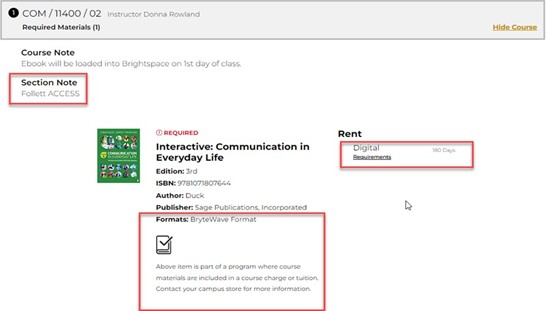
Follett provides instructions for accessing materials and support to students and faculty members. Follet will also communicate with faculty regarding product type and format adopted by faculty for the Program. Faculty can review details about the products adopted at your campus efollett.com site. The site will show any notes on Access participating titles and formatting (see below).
Access Pricing
Pricing for students is negotiated by the institution with Follett under a flat fee structure. Consistent with DC law, prices include sales tax. There are no additional fees for participating students under the Program, except if students elect to purchase optional or recommended course materials. Pricing is set by academic year and can be found on the university’s tuition and fees schedule and the Program website.
Required Material Access and Distribution
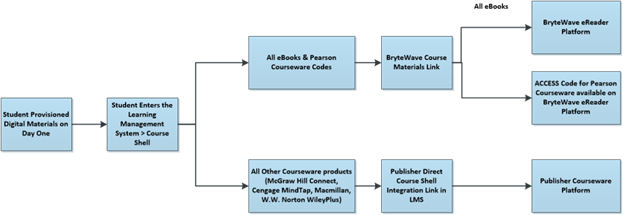
Digital materials are made available via Canvas and publisher websites, generally about 2 weeks in advance of the first day of classes. Physical products will be available for pick-up in the Campus Store. Students will receive a confirmation email letting them know when print material is ready and available for them to pick up.
Most digital content eBooks and courseware will be made available within your campus Learning Management System, with access to some products being emailed directly to students. It is recommended that instructors reach out and work with their publisher representatives to confirm digital courseware set up in the LMS (Learning Management System) and understand how students will access it.
Some courseware products may require an access code. Those codes, depending on the product, will be made available either within BryteWave bookshelf, emailed to the students directly, or as physical codes made available in the store for pick-up. Some of these courseware products will direct students to access their product webpage/URL outside of the LMS. This depends on the product and vendor.
Canvas “My Materials” Access Instructions
- Navigate to AU’s Canvas Login.
- Login with your AU credentials via SSO.
- Locate and select My Materials.
- You’ll be redirected to the My Materials platform where you can access your digital materials.
- Note, if more than one user role is available to you, you can toggle between these roles as needed.
- Click on the circular icon in the upper-right corner to expand the account menu.
- Click the Role menu option and select an alternate role from the list that displays.
Add/Drop Deadline and Program Participation
The last day for a student to opt out of the Program is the add/drop deadline each semester. Students receive direct emails, campus-wide communications, and on-campus marketing alerting them to this important deadline.
- If students ppt out of the Program, they need to acquire their own course materials.
- If a student picked up print materials, they need to return them before they can opt out of the Program.
- Opt-out appeals can be made in writing with supporting documentation to eagleaccess@american.edu.
Additional Information and Resources
Please visit the Program Website for additional information. You can also reach out for assistance via email at eagleaccess@american.edu; via phone at (202) 885-6301; or in person at the Campus Store located in the Lydecker Tunnel.
Helpful Links: